

Description
Learn with Spaced Repetition on Any Device
Overview
AnkiDroid is a mobile flashcard application designed to enhance learning efficiency through spaced repetition. Built to work seamlessly with the desktop version of Anki, it enables users to study anytime and anywhere—ideal for leveraging idle moments during commutes, waiting lines, or short breaks. The software supports a wide range of content types, including text, images, audio, and LaTeX formatting, making it suitable for language acquisition, academic review, medical terminology, and more.
Target users include students, language learners, professionals preparing for certifications, and anyone seeking a structured, evidence-based method for long-term retention. The application integrates directly with AnkiWeb, allowing synchronized access to flashcard decks across multiple devices. This ensures continuity between desktop and mobile workflows, enabling users to create, edit, and review cards on their preferred platform.
Developed by the AnkiDroid Team, the software is open source and maintained with a focus on accessibility and cross-platform compatibility. It supports multiple languages and offers a fully customizable interface, empowering users to tailor their study experience. While no specific developer background is provided, the project’s long-standing presence in the education technology space reflects its reliability and community trust.
Key Features & Capabilities
- Spaced Repetition System (SRS) – Uses the SuperMemo 2 algorithm to schedule card reviews at optimal intervals, improving long-term memory retention.
- Full Sync with AnkiWeb – Enables seamless synchronization between Android, ChromeOS, and desktop versions of Anki, ensuring data consistency across devices.
- Rich Media Support – Allows flashcards to include text, images, audio clips, and LaTeX for complex formatting, ideal for scientific and language learning.
- Over 6,000 Free Premade Decks – Offers ready-to-use collections for languages, medicine, law, programming, and other subjects, reducing setup time.
- Dictionary Integration – Supports automatic card creation from web dictionaries (Leo.org, Aedict, GoldenDict, ColorDict) and third-party apps via intent.
- Text-to-Speech & Custom Fonts – Enhances pronunciation learning and visual customization for better user engagement.
- Offline Functionality – All study sessions can be conducted without internet access after initial sync.
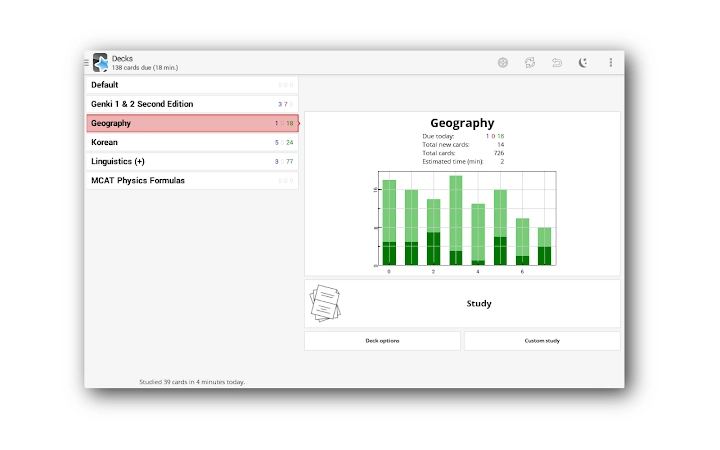
- Advanced Navigation & Customization – Swipe, tap, and shake gestures, night mode, tablet layout, and full backup system provide flexibility and user control.
These features make AnkiDroid particularly effective for self-directed learners who value consistency and deep retention. For example, a medical student can review anatomy terms with labeled images on a tablet during a break, while a language learner can add new vocabulary from a dictionary app with a single tap. The ability to create and share decks also fosters collaborative learning environments.
User Interface, Workflow & Performance
The user interface of AnkiDroid is clean and functional, prioritizing ease of navigation and efficient workflow. Cards are displayed in a simple, distraction-free format, with intuitive controls for answering, reviewing, and adjusting difficulty. Users can navigate through decks using swipe gestures, tap to reveal answers, or shake the device to skip a card, offering multiple interaction methods to suit different preferences.
Workflow efficiency is high, especially when paired with the desktop Anki application. Creating new cards on a PC and reviewing them on a mobile device maintains continuity, while the card editor and browser allow on-the-go adjustments. The app supports dynamic deck handling, meaning users can organize and restructure their collections without disrupting study progress.
Performance details were not specified by the developer. However, based on general behavior of similar applications, the app operates smoothly on modern Android and ChromeOS devices. The 20 MB installation size suggests lightweight resource usage, though actual CPU and RAM behavior were not disclosed. Stability appears consistent, though occasional issues with the ARC runtime on ChromeOS may affect updates, as noted in official documentation.
Compatibility & System Requirements
AnkiDroid is available for Android, ChromeOS, Windows, Mac, and Linux, ensuring broad accessibility across personal computing platforms. The current version is 2.17.1, with a file size of 20 MB, indicating a compact installation footprint.
For ChromeOS users, the app is accessible via the Google Play Store or the Chrome Web Store. However, the latter requires the Android Runtime Container (ARC), which downloads automatically if no other ARC apps are installed. This one-time download can be large—approximately 500 MB—and is outside the control of AnkiDroid. Users are advised to ensure sufficient storage space before installation.
Exact system requirements were not listed. Compatibility with specific hardware configurations, such as minimum RAM or processor speed, is not specified. The app relies on synchronization with AnkiWeb, so a stable internet connection is required for initial setup and regular syncs. The only supported method for transferring decks to ChromeOS is through cloud sync.
Pros and Cons
Pros
- Free and open source with transparent development
- Seamless synchronization with Anki desktop and AnkiWeb
- Supports rich media and LaTeX for complex content
- Over 6,000 free, high-quality premade decks available
- Offline study capability with full functionality
- Highly customizable interface and navigation
- Integrates with dictionary apps for instant card creation
Cons
- ARC runtime on ChromeOS may cause update issues
- No detailed system requirements provided
- Initial setup on ChromeOS requires significant storage for ARC
- Dependent on AnkiWeb for cross-device sync
- Learning curve for first-time users unfamiliar with spaced repetition
FAQ Section
Is AnkiDroid compatible with Windows and Mac?
Yes, AnkiDroid is compatible with Windows, Mac, and Linux through synchronization with the desktop version of Anki. The mobile app can access and update decks created on these platforms via AnkiWeb.
Can I use AnkiDroid without an internet connection?
Yes, once your flashcard decks are synced, you can study offline. All reviews, card creation, and navigation functions work without internet access.
How do I get AnkiDroid on ChromeOS?
You can install AnkiDroid via the Google Play Store or the Chrome Web Store. If using the Web Store, the Android Runtime Container (ARC) will be downloaded automatically, which may require up to 500 MB of space.
Is AnkiDroid safe to download and use?
Yes, AnkiDroid is open source and available through official app stores. It does not collect user data and relies on secure cloud sync via AnkiWeb.
Does AnkiDroid support automatic card creation from dictionaries?
Yes, AnkiDroid supports adding cards directly from dictionary apps using intents. It integrates with ColorDict, GoldenDict, Leo.org, Aedict, and various web-based dictionaries.
Final Thoughts
AnkiDroid delivers a powerful, flexible, and accessible solution for anyone committed to long-term learning. Its integration with the proven spaced repetition system, combined with robust cross-platform support, makes it a standout choice in the productivity and education space. The open-source nature ensures transparency and community-driven improvements, while the extensive library of free decks lowers the barrier to entry.
While users on ChromeOS may encounter occasional ARC-related issues, these are external to the app itself. For students, professionals, and lifelong learners, AnkiDroid offers a reliable way to build and maintain knowledge efficiently. Its focus on evidence-based learning, customization, and offline access makes it a top-tier tool in its category.
Download AnkiDroid now
Guides & Tutorials for AnkiDroid Flashcards App for Chrome
How to install AnkiDroid Flashcards App for Chrome
- Click the Preview / Download button above.
- Once redirected, accept the terms and click Install.
- Wait for the AnkiDroid Flashcards App for Chrome download to finish on your device.
How to use AnkiDroid Flashcards App for Chrome
This software is primarily used for its core features described above. Open the app after installation to explore its capabilities.
User Reviews for AnkiDroid Flashcards App for Chrome 0
No reviews found





